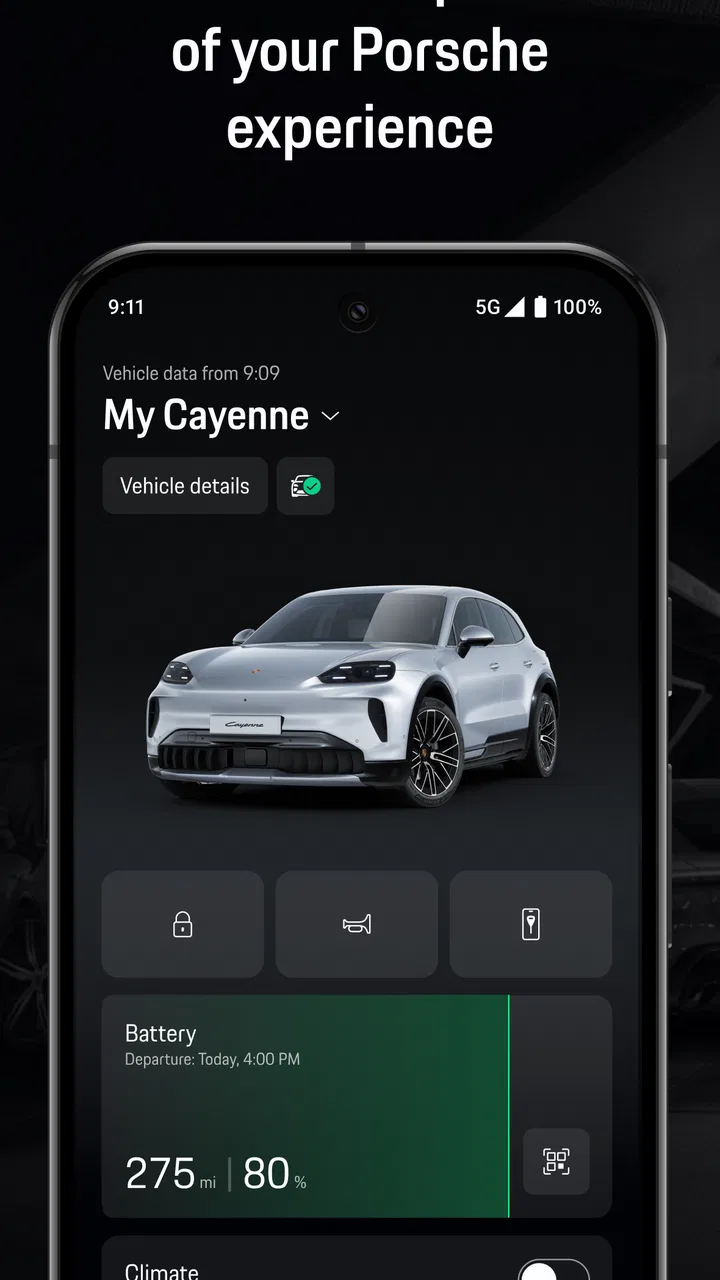
My Porsche
- 3.9
- Rating
- 50.00K
- Installs
- Free
- Price

 Analysis by App-foxy
I approached My Porsche as more than a digital garage badge. It is a free Android app in the Auto & Vehicles category, developed by Porsche Cars North America, Inc., and its purpose is to act as a digital companion for people who already have a meaningful connection with the brand. That distinction matters: this is not a general driving utility, a navigation replacement, or a universal car-maintenance tracker.
After spending time with it, my main impression is that its value depends heavily on how closely your daily life is tied to a Porsche vehicle and its ownership experience. If you want a focused way to manage Porsche-related information and interactions in one place, the concept makes sense. If you simply need directions, fuel prices, parking, or a maintenance log that works with any car, a broader automotive app will probably be more useful.
The app has an average rating of 3.9 from around 954 ratings, with roughly 195 written reviews, and it has passed 50K+ installs. Those figures suggest a real but fairly specialized audience rather than a mass-market tool. It is rated for Everyone, and the app is available at no cost, which makes trying it relatively easy for an eligible owner or enthusiast.
You May Also Like

 Google Keep - Notes and lists
Google Keep’s Quiet Growth Shows the Appeal of Simpler Notes
As mobile work gets busier, Google Keep keeps winning a simple contest: capture a thought quickly, find it later, and get on with the day.

 Blood Strike: 2.5 Anniversary
Blood Strike’s Loadouts Turn Every Drop Into a Tactical Gamble
A close look at Blood Strike’s custom loadouts: how fast access to signature weapons reshapes its battle royale rhythm, rewards preparation, and narrows the gap between fights.

 Pandora - Music & Podcasts
Pandora’s Music Is Easy to Start, but Harder to Recover
Pandora’s strength is its low-effort path from a seed to a station. Its weak spot is how much confidence it asks you to place in connection, setup, and quiet recovery.

 8 Ball Pool
 Is Built on Rivalries, Rematches, and Routine
A close look at the rivalries, rematches, shared routines, and unanswered safety questions that turn a quick pool match into a persistent mobile community.

 Samsung Music
’s Quiet Strength Is Playing What You Already Own
Its reach comes less from spectacle than from dependable access to a personal library. That simplicity is both the app’s strongest retention engine and its ceiling.

 AccuWeather: Weather Radar
AccuWeather Review: A Quick, Clear Forecast for Everyday Decisions
For everyday plans, the best forecast is the one you can understand quickly. AccuWeather makes rain timing, radar, and local conditions easy to act on, with a few trade-offs.
More From Our News Desk



Trust starts with knowing what the app is for
The first trust question I would ask is simple: does the app have a clear job? In this case, the answer is reasonably clear from its identity as Porsche’s digital companion. The developer is named openly as Porsche Cars North America, Inc., and the app is presented as an official Porsche experience rather than an unrelated third-party service using the brand’s name.
That official context is useful, but it should not automatically settle every privacy or account question. A recognizable developer can make an app feel safer, yet I still prefer to inspect the sign-in flow, permission prompts, privacy choices, and account settings before treating any connected-car application as part of my routine. Trust is built through visible controls, not just a familiar logo.
My Porsche is also a relatively focused product. I would not install it expecting the breadth of Google Maps, a dedicated roadside-assistance platform, or a workshop-management app. Its strength is the relationship between a Porsche owner and the manufacturer’s digital services. That narrow purpose is a benefit when you want fewer unrelated tools, but it becomes a limitation if you own several brands or want one dashboard for every vehicle in your household.
The release date of October 28, 2021, gives useful context. This is not a brand-new experiment, yet the current version, 19.26.21-pcna+174020, shows that the app has continued along its own development path. I would still treat version changes as a reason to review settings again, especially if the app gains new connected services or changes how account information is displayed.
What I would check before making it part of my routine
My first setup would be deliberately cautious. I would install the app from the official Android store, confirm that the developer name matches Porsche Cars North America, Inc., and read each permission request instead of approving everything automatically. I would also check whether the app lets me manage communication preferences separately from essential account messages.
That small pause is particularly worthwhile with a vehicle-related app. A phone can hold location history, contacts, notifications, and account credentials, while the car itself can be associated with ownership records and service activity. I am not saying every one of those items is necessarily collected by this app; I am saying that the combination deserves attention whenever an app connects a personal account with a vehicle.
The minimum operating-system requirement is Android 10. That is helpful for compatibility because it does not force users onto the newest phone software, but it also means I would keep the device updated for security rather than relying only on the app’s compatibility floor. An old operating system may run an application while still leaving the phone with broader security weaknesses.
Account controls matter more than the welcome screen
For me, the most important part of the experience is not the opening screen. It is what happens when I try to change an email address, remove a vehicle, adjust notifications, or stop using the account. A trustworthy companion app should make those choices understandable and easy to find. If a setting affects marketing messages, I want that choice to be distinct from messages needed for account security or vehicle-related service.
I would also look for a clear sign-out option and a way to review which vehicles or profiles are attached to the account. This is especially important if a phone is shared, sold, traded in, or used temporarily by another driver. Signing out before handing over a device is a basic habit, but an account page that makes connected items visible reduces the chance of leaving personal information behind.
Another practical check is whether the app remains useful when I decline an optional permission. Some applications explain why a permission is needed and allow the rest of the experience to continue. Others repeatedly interrupt the user or make the refusal feel like an error. I pay attention to that difference because respectful permission handling is a better sign of user control than a long list of promised features.
Where privacy choices become important in everyday use
A realistic scenario would be arriving at a Porsche center before a service visit. I might open My Porsche to check the account information connected with the vehicle, review any relevant messages, and confirm that I am using the correct profile before discussing details with staff. The useful habit here is not simply opening the app; it is checking the account context before sharing the phone or letting someone else look at the screen.
Another situation is selling or transferring a car. I would not assume that deleting the app removes the account relationship. Before the handover, I would review the profile, remove the vehicle if the interface provides that option, sign out, and then uninstall the application from the old phone. If the app presents separate account or support instructions, I would follow those rather than treating deletion as a complete privacy reset.
Travel creates a different kind of sensitivity. A vehicle companion can become part of a pattern showing when I drive, where I visit, or when the car is being used. I would therefore be careful with notification previews on the lock screen. Even if an alert is convenient, displaying vehicle or account details where other people can see them may not be worth the small time saving.
I also prefer to keep notifications purposeful. I would start with essential account and vehicle-related alerts, then add promotional or convenience notifications only if they genuinely help me. This makes the app easier to live with and reduces the chance that an important message gets buried among offers or reminders I no longer care about.
Permissions should be judged by the task
When a permission appears, I would ask what I am trying to do at that moment. If a function clearly needs location, I would consider allowing it only while using the app where Android offers that choice. If a feature does not need contacts, photos, or microphone access for my intended task, I would leave those permissions off. This is not about making the app unusable; it is about matching access to a real need.
I would revisit those choices after an update. Android’s permission manager makes it possible to see which apps have access to sensitive areas of the phone, and that review is worth doing periodically. The app’s current version may change its behavior or introduce a new workflow, so a permission decision made during first launch should not be treated as permanent.
Battery behavior is another practical consideration for connected automotive apps. I would watch the phone’s battery settings during the first few days rather than assuming the application is harmless or problematic. If background activity appears excessive, I would compare the app’s convenience with the cost and check whether Android offers a less permissive background setting without disabling the functions I actually use.
What the app can and cannot replace
I would not use My Porsche as my only navigation tool unless it clearly meets my route-planning needs. A dedicated navigation app usually offers a wider map ecosystem, traffic information, saved places, and cross-brand flexibility. The Porsche app makes more sense beside those tools, not necessarily instead of them.
The same applies to maintenance records. A Porsche-focused account can be more relevant to a Porsche owner than a generic spreadsheet, but a universal vehicle log may be better if I track several cars, motorcycles, insurance dates, tire changes, and receipts in one place. The trade-off is specialization: My Porsche can feel more coherent for one brand, while a general app often wins on breadth.
For roadside emergencies, I would keep a separate plan or phone contact available rather than assuming any single app will always be accessible. An app can be unavailable because of a dead battery, poor signal, a locked account, or a phone problem. That is not a criticism unique to Porsche; it is simply a sensible backup rule for anything connected to driving.
Three habits that make the experience safer and less frustrating
- Separate ownership from convenience. I would use the account for vehicle-related tasks, but avoid storing extra personal information in the profile unless it is genuinely needed. The fewer unnecessary details attached to an account, the easier it is to keep that account tidy.
- Review the vehicle association after a change. If I buy, sell, lease, or transfer a car, I would check the account immediately rather than waiting for the next service visit. An outdated vehicle list can create confusion and may expose information to the wrong person using a shared device.
- Keep a non-app backup. I would retain essential service contacts, ownership documents, and emergency information somewhere accessible without logging in. The app can be convenient, but convenience should not become the only route to something important.
These habits also answer a question many potential users have: do I need to be a constant app user for it to be worthwhile? In my view, no. If I only open it around ownership changes, service appointments, or specific Porsche-related tasks, that can still justify keeping it installed. The app does not need to become a daily ritual to be useful.
Who will appreciate it, and who should skip it
I think My Porsche is best suited to a Porsche owner who wants an official, brand-specific companion and prefers dealing with one account rather than piecing together unrelated tools. It can also appeal to a household where one person manages the vehicle information and wants a consistent place to check the Porsche relationship from a phone.
I would be more hesitant to recommend it to someone who does not own a Porsche, someone looking for a universal car dashboard, or someone who mainly wants navigation and traffic. In those cases, the app’s specialized identity becomes a drawback. A general automotive platform may provide more value with fewer brand boundaries.
I would also ask whether the person is comfortable with connected accounts. If the idea of linking a vehicle to a manufacturer profile feels unnecessary, the app may not earn a permanent place on the phone. The right choice is not the app with the most polished branding; it is the one whose account relationship matches the user’s comfort level and actual needs.
My cautious verdict after weighing convenience against control
My Porsche is a sensible niche app rather than an essential tool for every driver. Its strongest point is focus: it is built around the Porsche ownership relationship, and its official developer identity gives the experience a clear point of accountability. Its free price and Everyone age rating also make it easy to test without a financial commitment.
My reservation is equally clear. A focused companion app can encourage users to place too much trust in one account, one phone, and one digital pathway. I would install it, inspect the permissions, review notification choices, and keep important information available elsewhere. I would also check the account after any vehicle transfer and sign out before another person receives the device.
With those precautions, I can recommend it to the right reader: someone who owns a Porsche and wants a dedicated digital companion, not someone searching for a complete all-purpose driving toolkit. The app earns its place when its brand-specific convenience saves time without asking me to surrender more access or information than the task requires. My final advice is to use it selectively, keep the controls visible, and let your actual Porsche-related needs—not the badge alone—decide whether it stays on your phone.
FAQs for My Porsche
01What features does the My Porsche app offer?
The My Porsche app provides a comprehensive suite of features designed to enhance the Porsche ownership experience. Users can remotely check vehicle status, schedule service appointments, and access a digital owner's manual. Additionally, features like real-time navigation updates and personalized vehicle settings ensure a seamless interaction with your Porsche.
02Is the My Porsche app compatible with all Porsche models?
The My Porsche app is compatible with most recent Porsche models, but it's essential to verify compatibility with your specific vehicle. Compatibility depends on the model year and the availability of certain features. Check the app store or the Porsche website for detailed compatibility information before downloading the app.
03How secure is the My Porsche app in terms of data privacy?
The My Porsche app prioritizes user data privacy and security. It uses robust encryption methods to protect personal and vehicle information. Porsche has implemented strict data management protocols to ensure that user data is not only secure but also handled in compliance with global privacy standards.
04Can I control my Porsche vehicle remotely with the app?
Yes, the My Porsche app allows users to perform several remote functions. You can lock or unlock doors, check fuel levels, and even pre-condition the climate. These remote capabilities provide added convenience and enhance the overall driving experience, making it easier to manage your vehicle from a distance.
05Is there a cost to using the My Porsche app?
The My Porsche app itself is free to download, but some features may require an active subscription to Porsche Connect services. Check with your local Porsche dealer or the official Porsche website for detailed information on any potential costs associated with premium features or services within the app.
Pros
- User-friendly interface enhances experience.
- Comprehensive vehicle status monitoring.
- Seamless integration with Porsche Connect.
- Efficient remote control of car functions.
- Real-time traffic and navigation updates.
Cons
- Limited functionality for non-Porsche models.
- Requires stable internet connection.
- Subscription needed for premium features.
- Occasional app crashes reported.
- High battery consumption on devices.

My Porsche
Gallery